You are here
Adobe Bridge CS3 Geotagger
Thu, 10/11/2007 - 12:51 — Aldo
When I've been working too hard on projects that take a lot of energy, I often indulge myself in doing something completely different (though Tessa would argue that it's still behind a computer, so it is not all that different).
Ian Wood showed me some nice workflow tools for Aperture, and I wanted to do something similar with Bridge. Bridge, unlike Adobe Lightroom, is relatively easily extensible; many of Adobe's own applications use javascript to plug into Bridge, and they have a very nice SDK. There's even an embedded browser available in Bridge, based on Opera.
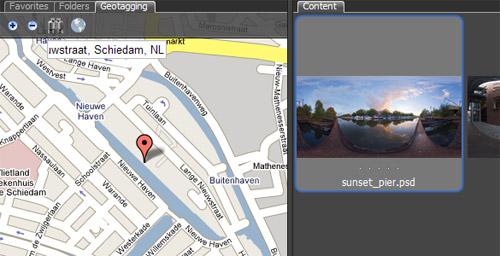
When I was reading in to the capabilities of the Bridge SDK, I could not believe that noone had come to the idea of loading a Google Map interface into Bridge. It sounded like an interesting idea to play around with, and I had the basics working in a couple of hours. Ofcourse getting it to work exactly like I wanted took substantially more than a couple of hours, but I have released an initial version.
There are quite a number of known issues with this release*, so at this point it should be regarded more as a proof of concept than anything else. A pretty proof of concept, but not a production quality tool at this point.
(*: the most serious issue being that using the Bridge Geotagger will probably result in a temporary IP ban from the satellite imagery from Google Maps; not just in Bridge, but in any browser from your IP address. Just so you know...)
It's been fun - yet frustrating from time to time - to work with a different set of limitations and bugs to work around from my normal work, working in Director. Bridge CS3 is an interesting beast, and I hope Adobe will continue making tools as extensible.
Anyway, back to the Lingo trenches...
PS: here's what would make the Bridge Geotagger script better:
- A jsFuncs callback construction for the TabbedPalette object
Both the content pane and NavBars allow for direct communication from javascript in an embedded webpage to the Bridge scripting interface (jsx). The TabbedPalette object misses this functionality. To work around this, the current Bridge Geotagger also opens a hidden NavBar and two Flash movies with a local connection object. It works, but it is not pretty - Bridge hands off control to the XMP file for raw files to ACR. ACR does not write the GPS data to the XMP file :-(
- Google Maps can not be licensed to run locally.
In order to use Google Maps, you need to sign up for an API key. An API key is bound to a web domain. Local files don't have a webdomain, so the API key can not be validated. Google knows this, and allows limited access for testing. Use this limited access too much, and you will get a temporary IP ban on satelite images. Arg!
- Aldo's blog
- Log in to post comments
Comments
Re: Adobe Bridge CS3 Geotagger
Ide about write something like that is a great idea!
Its a very useful tool.
I'll try it!
Thanks!
Just one question
Tool is great!
Just one question: how to cause it to startup on Bridge startup without Extendet Script?
Re: Just one question
In Bridge, go to the Preference. In the Startup Scripts section, there's a 'Reveal' button. If you press that, an Explorer/Finder window will open. Drop the Bridge Geotagger script in that folder, and the script should start automatically next time you start Bridge.
Re: Adobe Bridge CS3 Geotagger
you have some cool pics on here. you sound like you know alot about scripting
do you write custom scripts for bridge? I'd like to make a batch processor script that is hard coded without a dialog box.
Re: Adobe Bridge CS3 Geotagger
"Bridge, unlike Adobe Lightroom, was built from the ground up to be extensible; "
That's wrong. Lightroom is built with an inherently modular structure, and it is within scope to add additional modules. One might also say that Bridge is more itself an extension of Opera.
That said, nice work.
Re: Adobe Bridge CS3 Geotagger
I stand corrected (and have changed the wording in the article).